unreadherring
Unread Herring
Project maintained by artkay Hosted on GitHub Pages — Theme by mattgraham
Unread Herring
“Cut down the mightiest inbox.”
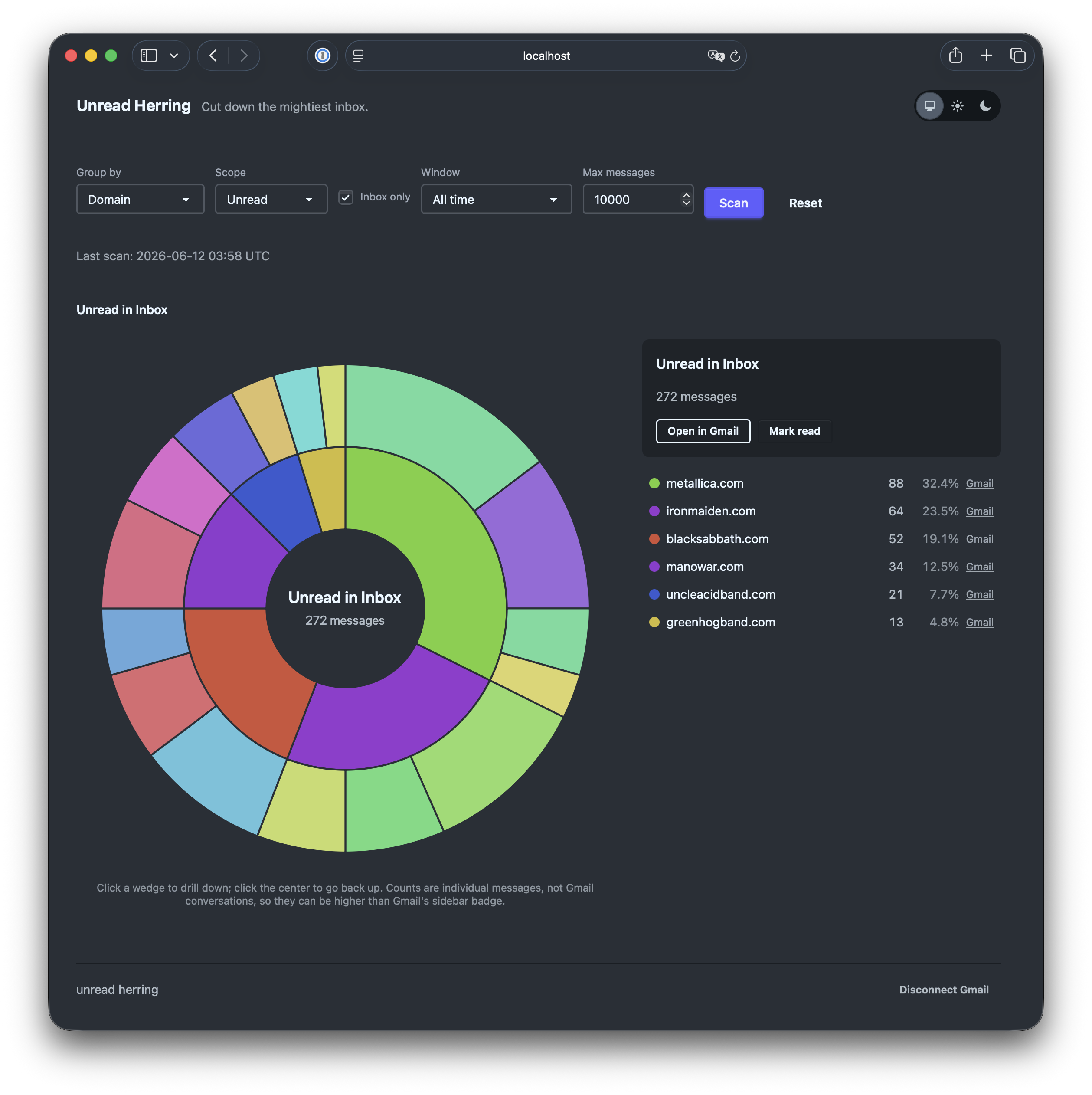
A local-first, open-source Elixir tool that scans your Gmail, renders an interactive sunburst of where your mail comes from (grouped by sender domain, sender, or label), lets you drill down through the rings, and lets you click a wedge to open that exact filtered view in Gmail. Built on Phoenix LiveView; launched from the terminal.
Nothing leaves your machine except calls to the Gmail API itself. No database, no hosted service, no telemetry, no shipped credentials.
Use at your own risk
This tool bulk-modifies your real mailbox. By using it you accept that you do so entirely at your own risk and that you must know what you are doing:
- You should understand what you are granting when you create the OAuth
client and approve the
gmail.modifyscope. - The only bulk action is mark read: it removes the UNREAD label and
nothing else (the app never archives, trashes or deletes). It is gated
behind confirmations, but marking thousands of messages read is still not
reversible from within the app: Gmail’s own
is:unreadsearches will no longer find them. - Gmail’s
from:search matches more broadly than the chart’s exact-domain grouping (subdomains, plus-addressing), so an action can affect somewhat more mail than the wedge count suggests. The confirm dialog says so. - The software is provided as is, without warranty of any kind (see LICENSE). The authors are not responsible for altered mail.
If any of the above gives you pause, explore the chart and the “Open in Gmail” links only, and leave the Mark read button alone.
How it works
mix herring.serveboots an OTP app with a Phoenix endpoint bound to127.0.0.1and opens your browser.- The first time, you are sent through a one-time Google OAuth flow (a
loopback redirect back to the same local endpoint). The token is stored in
~/.config/unread_herring/token.jsonwith0600permissions. - Pick a grouping (domain / sender / label), scope (unread / all) and time window, hit Scan, and watch the live progress bar while the BEAM fans out concurrent Gmail metadata reads. Scans cover the Inbox by default (matching Gmail’s sidebar badge); untick “Inbox only” to include archived and filtered-away mail. Counts are individual messages, not conversations.
- Explore the sunburst: click a wedge to drill down, click the center to go back up, click “Open in Gmail” to see the real filtered view, or bulk mark a bucket read. Mark read asks for confirmation (twice when it targets the whole scan result) and acted-on buckets gray out until the next scan. “Disconnect Gmail” revokes the app’s authorization at Google and deletes the stored token and local scan cache when you are done.
Setup: bring your own OAuth client (required)
This project requires Google credentials to work. You create your own OAuth client in your own Google Cloud project, so your data is only ever between you and Google:
- Go to Google Cloud Console and create
a project (any name, e.g.
unread-herring). - Enable the Gmail API: APIs & Services -> Library -> Gmail API -> Enable.
- Configure the OAuth consent screen: External, fill in the app name and your email, and add yourself as a test user. Leave the app in Testing mode - with only you as a user this is exempt from Google’s verification and CASA assessment.
- Create credentials: APIs & Services -> Credentials -> Create Credentials -> OAuth client ID -> Application type Desktop app.
- Hand the client to Unread Herring either way:
- download the JSON and save it as
~/.config/unread_herring/credentials.json, or -
export environment variables:
export GOOGLE_CLIENT_ID="...apps.googleusercontent.com"
export GOOGLE_CLIENT_SECRET="..."
- download the JSON and save it as
Note: while the consent screen is in Testing mode, Google may expire refresh tokens after about 7 days; just re-run the auth flow when prompted.
Running
mix deps.get
mix herring.serve     # boots on http://127.0.0.1:4000 and opens your browser
Useful extras:
mix herring.smoke     # prints sender-domain counts to stdout (API smoke test)
mix test              # full test suite; no live Gmail calls anywhere
Limits and tuning
-
Scan cap. A scan fetches at most 10,000 messages by default (newest first). Each scanned message costs one Gmail metadata request, and Gmail’s per-user quota works out to roughly 50 requests/second, so 10,000 messages take a few minutes. When a scan hits the cap the dashboard shows a warning, since the chart then only reflects the most recent slice. Adjust the cap per scan with the “Max messages” box in the dashboard controls (up to 100,000), or change the default it starts with:
HERRING_SCAN_MAX=50000 mix herring.serve -
Rate limiting. Google enforces a per-minute quota on top of the per-second one. Large scans can hit it; the app backs off and retries automatically, and if messages still could not be fetched the dashboard shows a warning that the chart is incomplete - wait a minute and scan again.
-
Bulk mark-read applies to at most 10,000 matching messages per click; the toast says “at least N” when there may be more, and clicking again continues where it left off.
Privacy model
- Every user is their own Google Cloud “app”, in Testing mode, scoped to themselves. The project never operates a shared OAuth client, so it never needs Google verification.
- OAuth scope ceiling is
gmail.modify, and the only write the code ever performs is removing the UNREAD label (mark read). There is no archive, trash or delete code path. - The endpoint binds to the loopback interface only.
- On-disk state is limited to
~/.config/unread_herring/(OAuth token,0600).
Packaging
Build and run a standard self-contained release:
mix assets.deploy                  # compile + digest assets (prod requires the manifest)
MIX_ENV=prod mix release
PHX_SERVER=1 PORT=4000 _build/prod/rel/unread_herring/bin/unread_herring start
Note: mix release builds for the current MIX_ENV, so a bare invocation
produces a dev-mode release under _build/dev/rel/... instead - set
MIX_ENV=prod for the real thing.
Development
Standard Phoenix app, no Ecto. See unread-herring-plan.md for the full
design document and CLAUDE.md for a condensed architecture overview.
License
See LICENSE.